OpenClaw memory-core-plus: Closing the Last Mile of AI Memory

I did a deep dive into OpenClaw's memory system architecture—from the 6-layer context protection mechanism to Hybrid Search internals, from Compaction's information loss patterns to local embedding model configuration. After setting up Qwen3-Embedding-0.6B, memory_search quality improved dramatically: exact keyword queries scored 0.74, and semantic understanding queries scored 0.85.
But in real-world usage, I found two "last mile" problems that remained unsolved.
What's Missing? Two "Last Mile" Problems
After configuring the vector database, memory search is already quite powerful. But here's the thing—strong search capabilities don't automatically make the memory system work well.
Problem 1: Memory Search Depends on the LLM Actively Calling It
memory_search is a tool that the LLM needs to "decide" when to invoke. Although the system prompt marks it as a "mandatory recall step," the LLM doesn't always reliably follow through—the official FAQ even has a section called "Memory keeps forgetting things" to address this issue.
In other words: the memory is right there in the database, but the LLM just didn't look for it.
Problem 2: Memory Writes Aren't Timely Enough
OpenClaw has two automatic memory writing mechanisms: the session-memory hook saves conversation summaries when users run /new; Memory Flush writes key information to memory/YYYY-MM-DD.md when the context approaches the window limit. Both have inherent lag—the former depends on user action, the latter only triggers when tokens are nearly exhausted.
In other words: preferences, decisions, and agreements made during a conversation don't get saved immediately.
Why Not Use Existing Open-Source Solutions?
Before building my own solution, I surveyed the leading open-source AI memory projects:
| Solution | Core Features | Main Issues |
|---|---|---|
| mem0 | Smart memory layer, auto-extract/merge | Requires external vector DB service |
| Cognee | Knowledge graph management | Too heavyweight, requires graph DB |
| Letta (MemGPT) | Layered virtual context management | Full agent framework, can't embed |
| Zep | Long-term memory service | Requires PostgreSQL + standalone deployment |
All these solutions need external databases or standalone services, while OpenClaw's memory system is built on local Markdown files + embedded vector indexing + local embedding models, supporting zero-config, offline operation. Introducing external dependencies contradicts its design philosophy.
More importantly, memory files store highly private information—user preferences, work habits, project decisions. Hosting this data in cloud vector databases essentially hands your most sensitive personal profile to third parties. Local storage is the best protection for your privacy. After all, "free" is always the most expensive.
Since there wasn't a mature solution addressing these two problems natively within OpenClaw's plugin ecosystem, I decided to build one.
memory-core-plus: Closing the Last Mile
Based on the analysis above, I developed the memory-core-plus plugin. It's a superset of memory-core, inheriting all original functionality while adding two automation capabilities to solve the problems described above.
Solving Problem 1: Auto-Recall
Instead of waiting for the LLM to "remember" to search, Auto-Recall automatically runs a vector semantic search using the user's message as a query before each LLM processing step, injecting relevant memories into the context.
The LLM doesn't need to actively call any tools—relevant memories simply appear in front of it.
Solving Problem 2: Auto-Capture
Instead of waiting until tokens run out or the user runs
/new, Auto-Capture uses an LLM to extract facts, preferences, and decisions from the conversation immediately after each agent run, writing them to memory files.
Memories are saved right after each conversation turn. Valuable information accumulates instantly—nothing is lost because you closed the terminal or forgot to run a command.
Under the Hood: How It Works
Auto-Recall Workflow
Auto-Recall registers on the before_prompt_build hook, triggering automatically before each LLM processing step:
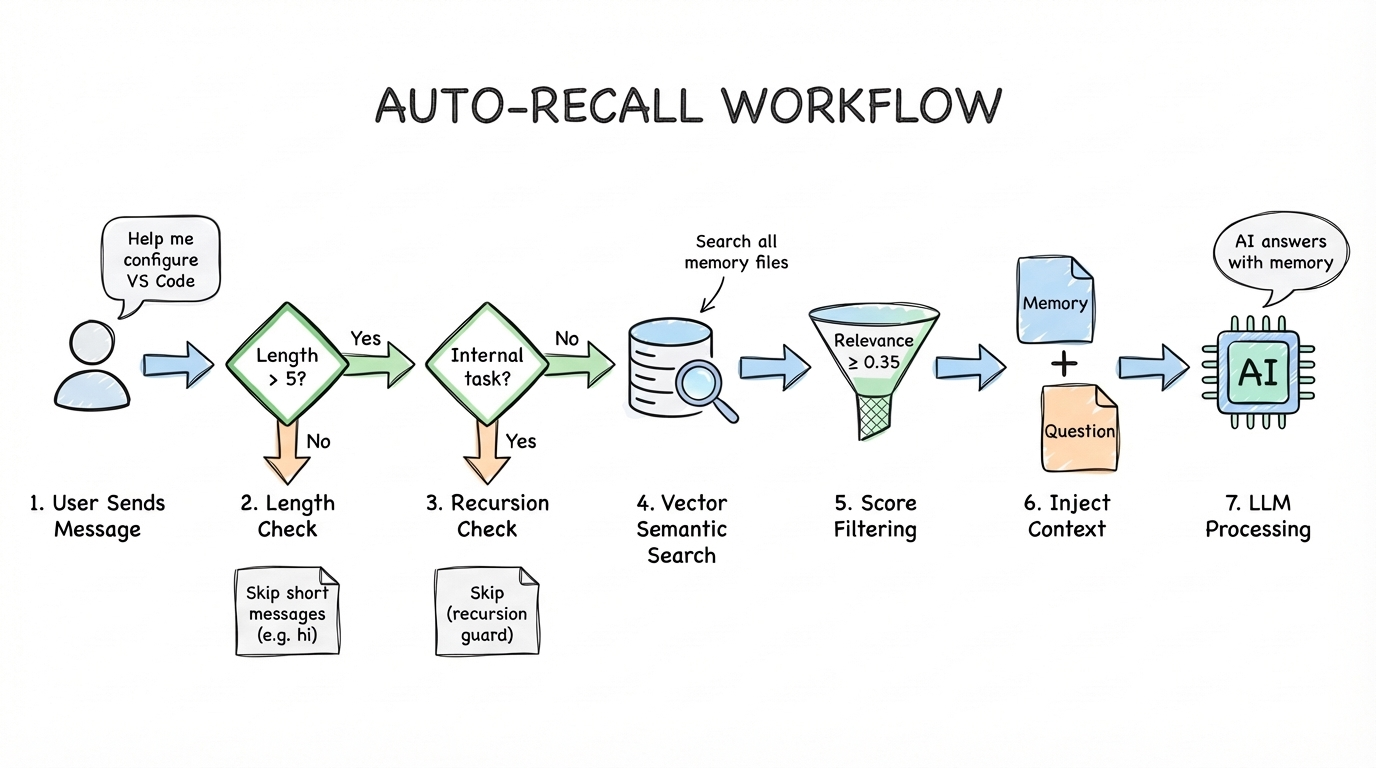
- Checks the user input length—short inputs (like "hi") are skipped to avoid unnecessary search overhead
- Checks whether this is a memory-related internal run (like a capture subtask) to prevent recursion
- Uses the user's message as a query to perform vector semantic search across all memory files—this isn't simple keyword matching, but embedding-based semantic similarity computation
- Filters results by relevance score threshold (default 0.35), keeping only relevant memories
- Injects matched memories into the LLM's context. The LLM ultimately sees: relevant historical memories + the user's original question
Auto-Capture Workflow
Auto-Capture registers on the agent_end hook, triggering automatically after each agent run:
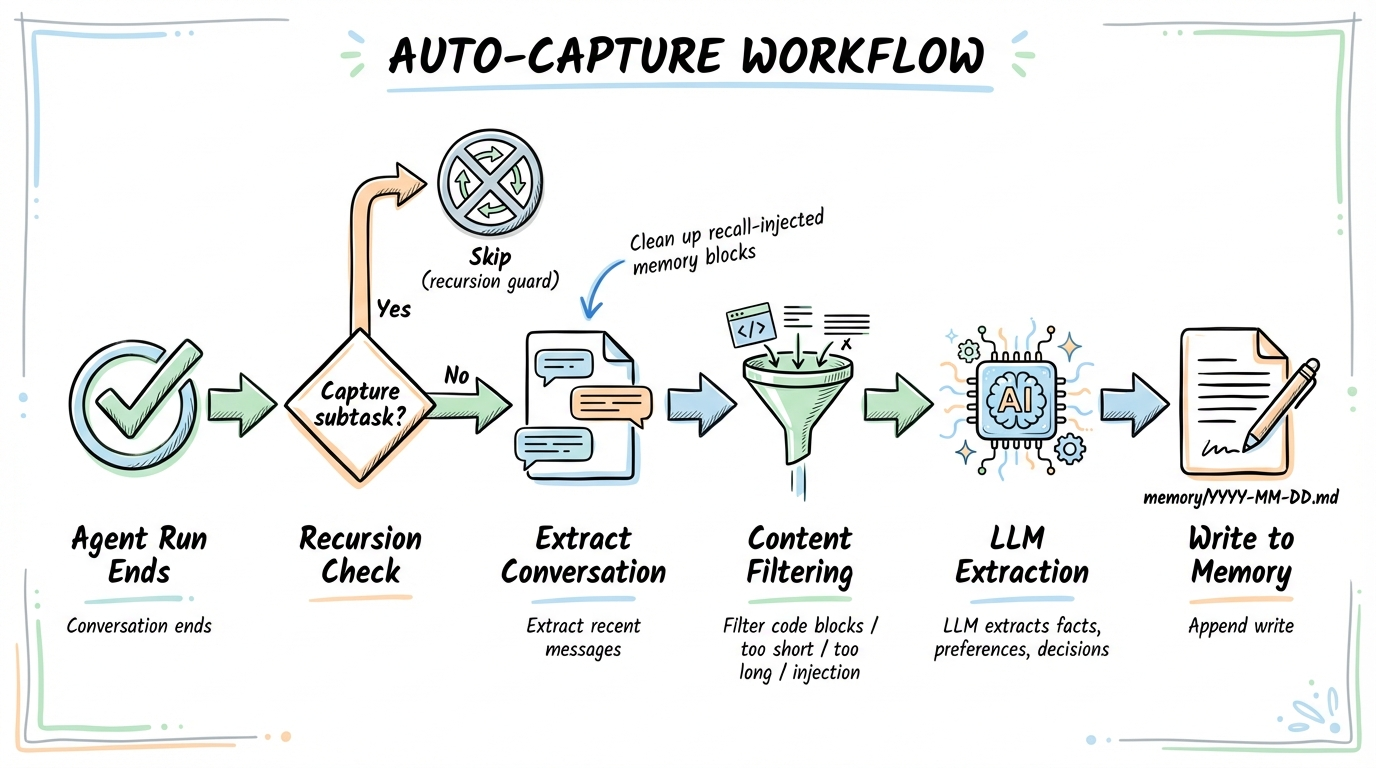
- Checks recursion guards to ensure capture subtasks don't trigger another capture
- Extracts recent conversation messages, cleaning out memory blocks injected by recall
- Filters out content unsuitable for memory: code blocks, overly short/long text, suspected prompt injection content
- If valuable content exists, launches a dedicated LLM subtask to extract persistent facts, preferences, and decisions from the conversation
- Extracted information is appended to
memory/YYYY-MM-DD.mdfiles
The Closed-Loop Memory System
Together, they form a complete closed loop:
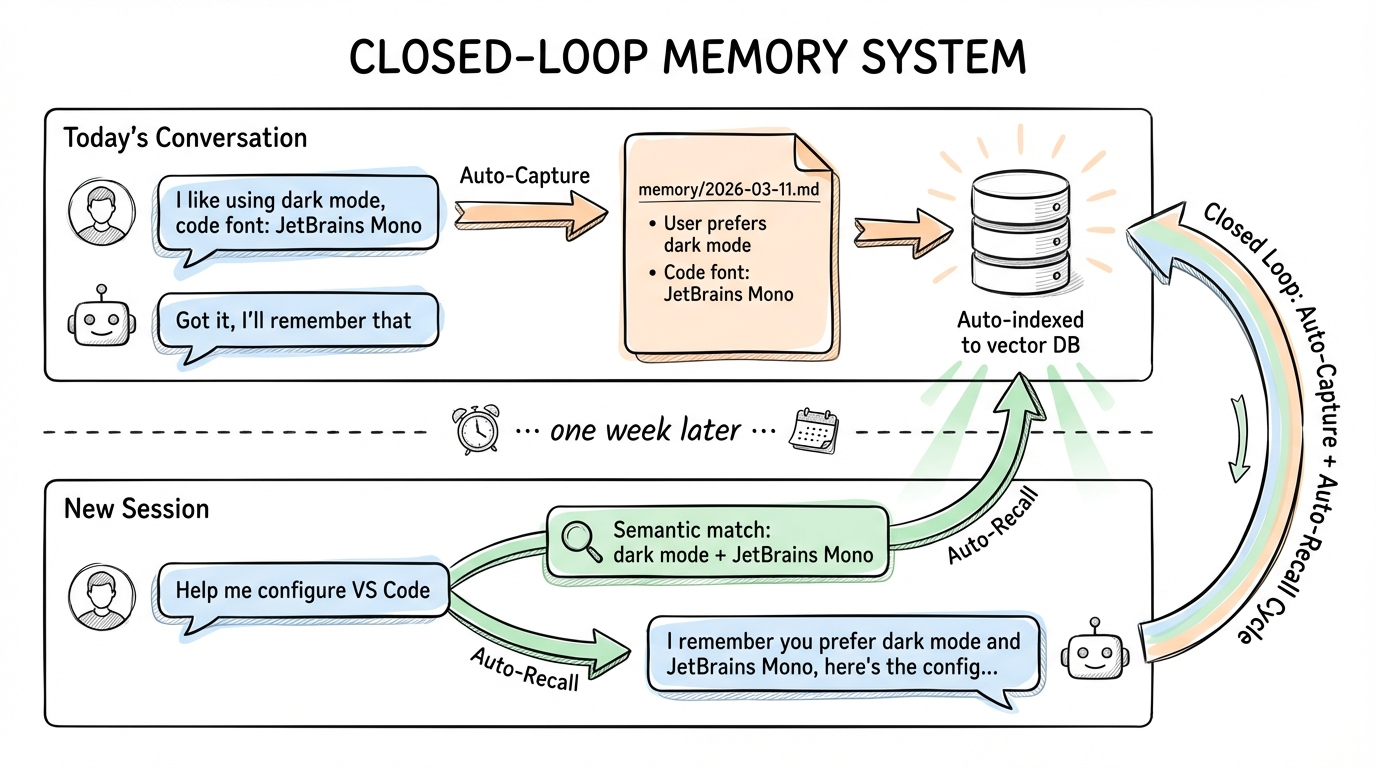
Today's conversation
You: "I like using dark mode, and JetBrains Mono for code font"
AI: "Got it, I'll remember that" → Auto-Capture extracts → Writes to memory/2026-03-11.md → Auto-indexed to vector database
......one week later......
New session
You: "Help me configure VS Code" → Auto-Recall searches → Semantic match: "dark mode" + "JetBrains Mono"
AI: "I remember you prefer dark mode and JetBrains Mono font, here's the configuration..."
After memory files are written, OpenClaw's file watcher automatically detects changes and triggers incremental indexing—chunking, generating embeddings, and writing to the vector database. Even if the process exits and restarts, the next search will automatically catch up on indexing.
Security Mechanisms
The plugin includes multiple layers of security:
- Prompt injection detection: Messages containing patterns like "ignore previous instructions", "you are now", "jailbreak", etc. are filtered out before capture
- HTML entity escaping: All memory content injected into prompts is escaped (
&,<,>,",') to prevent markup injection - Untrusted data labeling: Recalled memories are wrapped in
<relevant-memories>tags with an explicit instruction to treat them as untrusted historical data - Recall marker stripping: Before capture, any
<relevant-memories>blocks are stripped from conversation text to avoid persisting injected context as new memories - Recursion prevention: The capture subagent's session key contains
:memory-capture:, and the hook checks bothtriggerandsessionKeyto break potential infinite loops - Idempotency protection: An
idempotencyKeyprevents duplicate captures within the same run
Installation & Usage
One Command to Install
openclaw plugins install memory-core-plus
This single command handles everything:
- Downloads and installs the plugin to
~/.openclaw/extensions/memory-core-plus/ - Enables the plugin (
plugins.entries.memory-core-plus.enabled = true) - Sets the memory slot (
plugins.slots.memory = "memory-core-plus") - Disables competing memory plugins (e.g. built-in
memory-core)
Then restart the gateway to load the plugin:
openclaw gateway restart
Auto-Recall and Auto-Capture are both enabled by default. To disable either:
openclaw config set plugins.entries.memory-core-plus.config.autoRecall false
openclaw config set plugins.entries.memory-core-plus.config.autoCapture false
After enabling the plugin and starting a chat, you'll see the following in the gateway logs:

Once installed, no additional action is needed. memory-core-plus runs fully automatically:
- Every time you send a message, Auto-Recall searches for relevant memories and injects them into context
- After each conversation ends, Auto-Capture extracts valuable information and writes it to memory files
- The original
memory_searchandmemory_gettools remain available
Configurable Parameters
| Parameter | Default | Description |
|---|---|---|
autoRecallMaxResults | 5 | Maximum number of memories injected per query |
autoRecallMinPromptLength | 5 | Minimum prompt length (chars) to trigger recall |
autoCaptureMaxMessages | 10 | Maximum recent messages to analyze for capture |
The relevance score threshold for Auto-Recall is controlled by the core search manager's memorySearch.query.minScore setting in openclaw.json, not by plugin config.
Uninstall & Rollback
To remove the plugin and revert to the built-in memory-core:
openclaw plugins uninstall memory-core-plus
openclaw gateway restart
The gateway automatically falls back to the built-in memory-core plugin. No extra configuration needed.
Viewing Memory Content
# List all memory files
openclaw memory list

# Search memories
openclaw memory search "package manager preference"
Memory files are plain Markdown files stored in ~/.openclaw/workspace/memory/. You can view, edit, or delete them with any editor.
Demo Scenarios
Scenario 1: Preference Auto-Capture & Recall
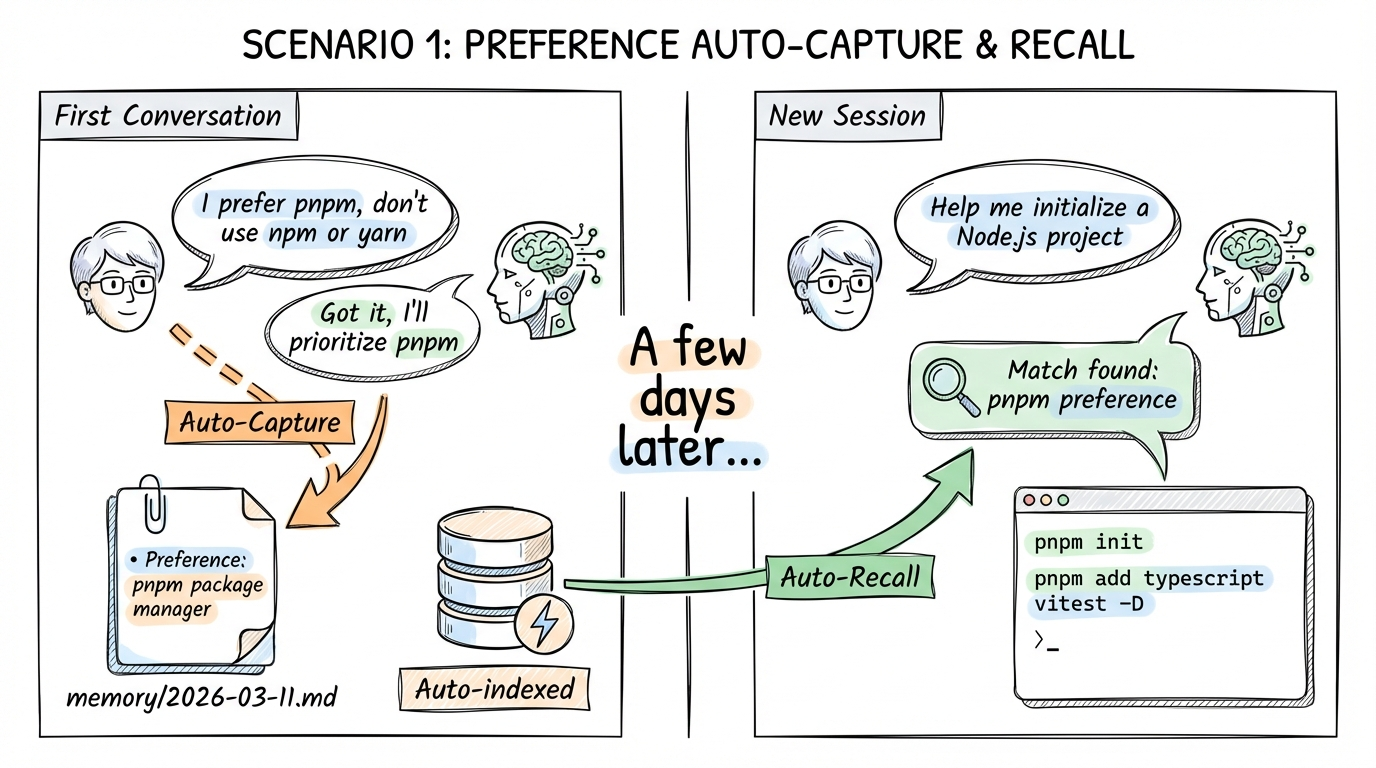
First conversation
You: "I prefer using pnpm as package manager, don't use npm or yarn"
AI: "Got it, I'll prioritize pnpm from now on." → Auto-Capture captures → Writes to memory: preference for pnpm package manager
......a few days later, new session......
You: "Help me initialize a new Node.js project" → Auto-Recall finds pnpm preference
AI: Directly uses pnpm init, pnpm add typescript vitest -D
Scenario 2: Project Context Continuity
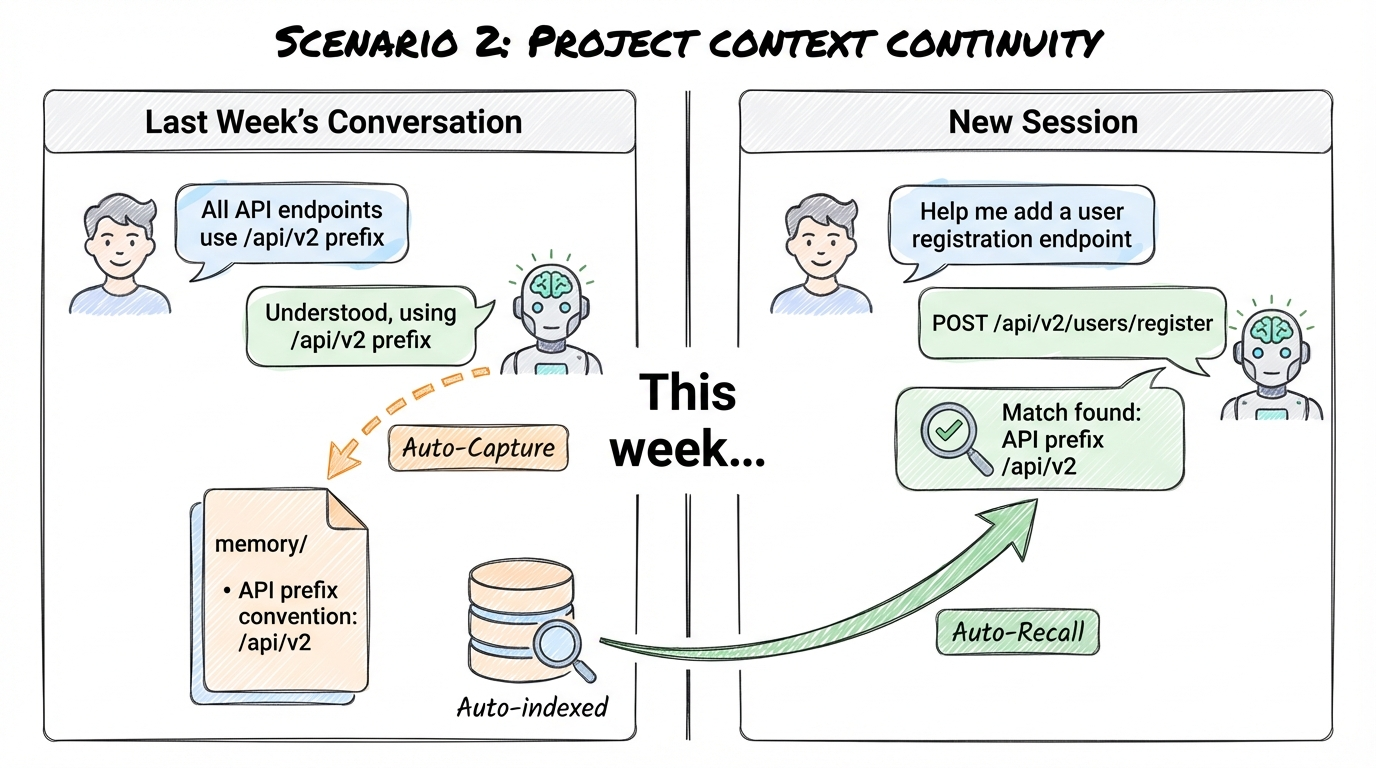
Last week's conversation
You: "All API endpoints should use the /api/v2 prefix"
AI: "Understood, all endpoints will use the /api/v2 prefix." → Auto-Capture captures → Writes to memory: API prefix convention /api/v2
......this week, new session......
You: "Help me add a user registration endpoint" → Auto-Recall finds API prefix convention
AI: Uses the project's agreed /api/v2 prefix → POST /api/v2/users/register
One More Thing
While developing Auto-Capture, I discovered a bug in OpenClaw's core code: the agent_end hook's context object was missing the trigger and channelId fields, preventing plugins from distinguishing user-initiated runs from automated ones, causing recursion guards to fail.
I submitted a fix PR (#42362), while also implementing a sessionKey double-guard as a fallback in the plugin. The PR has since been reviewed and merged into main and release on version 3.11, which has already unlock this plugin's full potential!
memory-core-plus is an open-source project. Feel free to try it out and share your feedback: